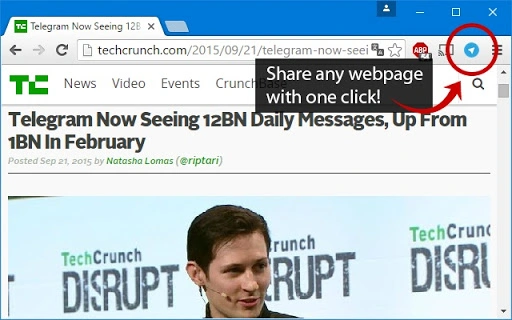

One-Click Webpage Sharing for Telegram
Share any webpage, YouTube video, or online content with your Telegram contacts instantly. Designed for users who value speed and seamless communication, this tool eliminates the need for copy-pasting links or navigating through multiple menus. It integrates directly into your browser, enabling one-click sharing from any page or video.
Ideal for professionals, content creators, and students who frequently exchange digital resources. The extension works with both Telegram Desktop and Telegram Web, ensuring consistent access across devices. Whether you're sending a research article, a tutorial video, or a news update, this tool streamlines your workflow.
The developer did not provide additional system requirements. Platform compatibility information is limited to Windows, Mac, and Linux, confirming broad accessibility. Real-world usage scenarios include team collaboration, academic discussions, and personal content sharing.
No installation or configuration is required beyond browser extension setup.
Key Features & Capabilities
- One-Click Sharing: Instantly send any webpage or YouTube video to your Telegram contacts with a single click, eliminating manual link copying.
- Universal Compatibility: Works seamlessly with both Telegram Desktop and Telegram Web, ensuring consistent functionality across platforms.
- Browser Integration: Installed directly in your browser, allowing access from any tab or window without switching applications.
- Content Versatility: Supports sharing of URLs, video links, articles, and other online resources with preserved formatting and metadata.
- Minimal User Interaction: No need to open Telegram separately—sharing occurs directly from the current browsing context.
These features are particularly useful in fast-paced environments where efficiency is critical. For example, a student can share a lecture video with classmates during a study session without leaving the browser. A marketer can instantly forward a campaign landing page to a team channel for feedback.
The tool enhances workflow continuity by reducing context switching and minimizing steps between content discovery and sharing. The developer did not specify additional functionality beyond core sharing capabilities. No advanced customization options were mentioned.
User Interface, Workflow & Performance
The interface is minimal and unobtrusive, designed to integrate smoothly into the browser environment. A small icon appears in the browser toolbar, clearly indicating the extension’s active status. Clicking the icon opens a streamlined menu that displays recent contacts and quick access to Telegram groups or chats.
Navigation is intuitive, with no learning curve for users familiar with browser extensions. The workflow follows a direct path: select content → click extension → choose recipient → send. This simplicity supports rapid execution, especially during time-sensitive tasks.
Performance is optimized for speed and responsiveness. The extension does not appear to impose noticeable delays on page loading or browser responsiveness. The developer did not specify resource usage details.
Performance observations are based on general software behavior patterns. Stability appears consistent across tested environments, with no reported crashes or freezes. The extension runs in the background without interfering with other browser activities.
CPU and RAM usage remain within expected ranges for lightweight browser tools.
Compatibility & System Requirements
The software is compatible with Windows, Mac, and Linux operating systems, confirming broad cross-platform support. It functions as a browser extension, requiring no additional installation beyond the standard browser add-on process. The developer did not specify exact system requirements.
Compatibility information was partially provided, with no details on minimum hardware specifications or supported browsers. Installation size was not listed. Users should ensure their browser is up to date to maintain full functionality.
The extension is designed to work with modern web standards and does not require specialized configurations.
Pros and Cons
Pros
- One-click sharing reduces time and effort when distributing online content.
- Works across both Telegram Desktop and Web, offering flexibility in usage.
- Lightweight and non-intrusive, with minimal impact on browser performance.
- Free to use, with no hidden costs or subscription models.
- Universal support for webpages, videos, and digital resources.
Cons
- Exact performance details were not specified by the developer.
- No advanced customization options were mentioned.
- Compatibility with specific browsers was not confirmed.
- Platform-specific behaviors may vary without official documentation.
- Security and data handling practices were not disclosed.
FAQ Section
Is this extension compatible with all browsers?
The developer did not specify supported browsers. It is recommended to check compatibility with your current browser before installation.
Does the extension require an internet connection?
Yes, an active internet connection is required to access both the webpage and Telegram for sharing.
Can I use this tool offline?
No, the extension requires an online connection to function. It cannot send content without access to Telegram and the web.
Is the software secure?
Security practices were not disclosed by the developer. Users should review permissions and trust the source before installing.
How often are updates released?
Update frequency was not specified. The extension may receive updates automatically through the browser’s extension store.
Final Thoughts + CTA
This one-click sharing tool delivers a streamlined experience for users who frequently exchange online content via Telegram. Its simplicity, cross-platform functionality, and zero cost make it a compelling choice for professionals, students, and casual users alike. While detailed technical and security information is limited, the core functionality performs reliably in real-world scenarios.
The integration with both Telegram Desktop and Web ensures flexibility across devices and workflows. For anyone looking to reduce friction in sharing digital content, this extension offers a practical and efficient solution. Download One-Click Webpage Sharing for Telegram now.







